Blog

  • T-Mobile, AT&T, Verizon Device Unlock Policies

    T-Mobile, AT&T, Verizon Device Unlock Policies

    One of the hottest topics of the moment for the US wireless industry is device unlock policies or SIM unlock policies. With Verizon getting a waiver from the FCC to implement whatever unlock policy they would like, it’s probably a good idea that everyone knows what their carrier’s requirements are for unlocking a device.

    Below, we’ll run through the three major US carriers and each of their policies. Keep in mind that each carrier also has several sub-brands or MVNO or prepaid providers they own that might have different policies. These are the official policies if you were to purchase service directly from T-Mobile, AT&T, or Verizon.

    What is a SIM unlock?

    For those completely unfamiliar with all of this talk about unlocking phones, let’s back up for a minute. When someone buys a phone from a carrier, those phones are device or SIM locked to that carrier’s network. Should you buy a Pixel 10 Pro or iPhone 17 Pro from T-Mobile, for example, you couldn’t just immediately take that phone and then use it on AT&T’s network. That is technically T-Mobile’s phone and they want you to use it on their network until you fulfill several requirements.

    This is especially true if you purchase a phone on a device payment plan, like the 2-year and 3-year contracts that US wireless carriers have all adopted to try and get you into new phones earlier or without having to pay much. By giving you a deal on a new phone, they expect you to hang around for a while and pay for a monthly bill, which is how they make so much of their money.

    Because the world understands that you shouldn’t be forever locked to one single carrier with your device, carriers have adopted unlock policies that allow you to free a phone from their network and use it elsewhere. Again, this often only happens once several requirements are met.

    There are also different unlock policies for postpaid and prepaid plans, with postpaid being the type of service you likely have because postpaid plans are those that get you device upgrades and device payment plans for very cheap.

    On the flip side of all of this, you could buy a phone that is already unlocked and not have to deal with any of the unlocking business. Buying phones directly from Samsung, Google, and Apple will get you phones that are unlocked and have no requirements for unlocking – they just work on all carriers out of the box. Those phones often require you to pay full price, though, thus the reason so many buy from carriers on promotions.

    OK, so you understand what we’re talking about with SIM unlocks? Let’s move on to each carrier.

    T-Mobile Device Unlock Policy

    The T-Mobile SIM unlock policy for both postpaid and prepaid are pretty straight forward. On the postpaid side, theirs is probably the most consumer-friendly with the shortest amount of time you would have to wait before they would unlock. For prepaid, their policy could end up being a long-term commitment before you can get a phone unlocked.

    For both policies, T-Mobile will only unlock if the device is sold by T-Mobile, has not been reported lost/stolen/blocked, and is on an account in good standing.

    • Postpaid unlock policy: To unlock a postpaid phone sold by T-Mobile, you would need to keep it active on T-Mobile’s network for at least 40 days. If the phone is leased or financed through T-Mobile, you would have to pay for the device in full. If the phone is on a canceled account, the account would need a balance of zero. If you fulfill the requirements, you need to request the unlock.
    • Prepaid unlock policy: T-Mobile won’t unlock a prepaid phone unless it has been 365 days since it was activated on their network or if you have “had more than $100 in refills during that period for each line active on the account.” You would also have to wait at least 14 days from the moment the device was purchased.
      • Also, to be eligible, you can’t have more than 2 mobile device unlocks per line within the last 12 months.
      • If you fulfill the requirements, you need to request the unlock.

    You can view T-Mobile’s policy here.

    AT&T Device Unlock Policy

    The policy from AT&T is also quite straight-forward for both types of accounts. In fact, it might be the easiest to understand.

    • Postpaid unlock policy: For AT&T to unlock your postpaid device, you would have purchased it from them 60+ days ago. You’ll also have to pay for the device in full and it can’t be reported lost or stolen. If you fulfill the requirements, you need to request the unlock.
    • Prepaid unlock policy: On the prepaid side, AT&T states that they’ll unlock your device if it has 6 months of paid AT&T service, isn’t active on another account, and isn’t lost or stolen. If you fulfill the requirements, you need to request the unlock.

    You can view AT&T’s policy here.

    Verizon Device Unlock Policy

    Finally, we have Verizon’s policy, we just recently updated after being cleared of previous requirements from the FCC. The new policy is incredibly straight-forward, especially on the postpaid side.

    • Postpaid unlock policy: For Verizon postpaid, they will now automatically unlock your device once it has been paid off. Whether that’s a full retail purchase or you fulfill your device payment plan, it will be automatically unlocked. There is no time requirement like we see from T-Mobile and AT&T.
      • Update February 16: Verizon has added the policy to now state that “If you payoff a device payment agreement balance online or in the My Verizon App, or if a Verizon Gift Card is used to purchase a smartphone or pay off a remaining balance, the unlocking process will be delayed by 35 days.” This is a new requirement that will force you to wait an extra 35 days unless you pay with a correct payment method in-person, at a Verizon corporate store.
    • Prepaid unlock policy: On prepaid, Verizon is asking that prepaid devices purchased from them have 365 days of paid and active service. Once you complete those 365 days, they will automatically unlock your prepaid device.

    You can view Verizon’s policy here.

    Updated February 16, 2026 with an update to Verizon’s new policy that adds a 35 day delay to unlocks.

  • Everything New in Android 17 Beta

    Everything New in Android 17 Beta

    Android 17 Beta is officially live and we’ve got it up and running on a Pixel 10 Pro. You could have it on your device as well, since this is a beta build out of the gate, thanks to Google skipping the developer preview builds for this new version of Android.

    After a short mix-up on the launch, Google pushed out the Android 17 Beta 1 today to every Pixel device from the Pixel 6 up through the Pixel 10 series. If you own one of these devices, you can sign-up to receive the update to Android 17 Beta 1 through the Android Beta Program (here). Should you? Well, this is a beta, so you can expect bugs here and there. However, this should be much more stable than a developer preview and is probably safe enough to put on your device. Should you run into issues, you can always exit the beta program and start clean.

    Time to dive in and find fun new toys to play with.

    Everything new in Android 17 Beta

    Android 17 is indeed “CinnamonBun”

    Android 17 CinnamonBun

    Not that we didn’t believe the codename for Android 17 was “CinnamonBun,” but it’s now official. In this first Android 17 Beta 1 update, we can see it right here in the notification shade. Now I’m hungry.

    Pixel Launcher search bar can now be customized further

    Pixel Launcher Search Bar

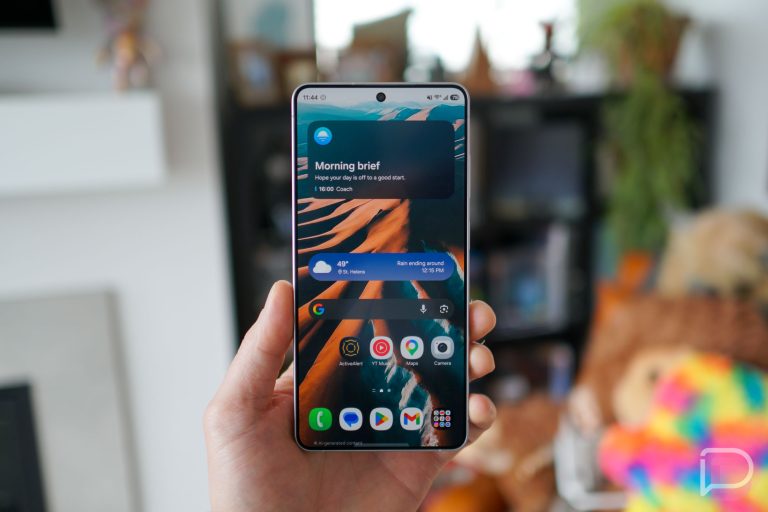
    This seems new to me – the Pixel Launcher’s Google Search bar can now be long-pressed and then customized. The options for customization, which used to only change a widget that was added to home screens, now actually changes the pinned search bar in the Pixel Launcher.

    Previously, at least on my Pixel 10 Pro XL running Android 16, you simply couldn’t long-press on it. However, you can customize a search bar in settings that look like this, but they then add an extra Search widget rather than update the pinned bar.

    It’s tough to know if this is a Pixel Launcher update or something to do with Android 17.

    Official Changelog – Android 17 Beta 1

    User Interface & Windowing

    Mandatory Large Screen Adaptivity

    Apps targeting Android 17 (API level 37) running on large screens (sw ≥ 600dp) can no longer opt-out of resizing or orientation changes.

    • Ignored Attributes: screenOrientation, resizeableActivity, minAspectRatio, and maxAspectRatio are ignored on large screens.
    • Exemptions: Devices smaller than 600dp and apps categorized as Games (android:appCategory).

    Optimized Configuration Changes

    To prevent state loss, the system no longer restarts Activities by default for specific configuration changes, including:

    • CONFIG_KEYBOARD / CONFIG_KEYBOARD_HIDDEN
    • CONFIG_NAVIGATION
    • CONFIG_TOUCHSCREEN
    • Action Required: If your app relies on restarts to reload resources for these events, you must explicitly opt-in using the new android:recreateOnConfigChanges manifest attribute.

    Performance & Runtime

    • Lock-free MessageQueue: A new lock-free implementation of android.os.MessageQueue reduces missed frames.
    • Generational Garbage Collection: ART’s Concurrent Mark-Compact collector now supports generational GC, prioritizing frequent, low-cost “young generation” collections.
    • New Profiling Triggers: ProfilingManager adds triggers for COLD_START, OOM, and KILL_EXCESSIVE_CPU_USAGE.
    • Notification Restrictions: Strict size limits enforced on custom notification views to reduce memory usage.

    Media & Camera

    Camera

    • Dynamic Session Updates: Use CameraCaptureSession.updateOutputConfigurations() to switch use cases (e.g., Photo to Video) without closing the session or causing glitches.

    Audio & Video

    • Constant Quality for Video Recording: setVideoEncodingQuality() in MediaRecorder allows you to configure a constant quality (CQ) mode for video encoders.
    • Background Audio Hardening: Audio playback, focus requests, and volume changes initiate silently (fail) if the app is not in a valid lifecycle state.
    • VVC Support: Added platform support for Versatile Video Coding (H.266).

    Privacy & Security

    • Cleartext Deprecation: android:usesCleartextTraffic is deprecated. Apps targeting SDK 37+ relying on this attribute will default to blocking cleartext; migrate to Network Security Configuration.
    • HPKE Hybrid Cryptography: Introduced a public Service Provider Interface for an implementation of HPKE hybrid cryptography.

    Connectivity & Tools

    • Companion Device Manager:
      • New Profiles: Medical Devices and Fitness Trackers.
      • Unified Permission Dialog: setExtraPermissions bundles nearby permissions into the association dialog.

    UPDATE FEBRUARY 15 – Since this update has been so light on changes that you might notice, we’ve gone ahead and added the official set of release notes from Google.

  • Android 17 Beta 1 is Actually Here for Your Pixel

    Android 17 Beta 1 is Actually Here for Your Pixel

    UPDATE FEBRUARY 13 – Google tried to ship out the first Android 17 Beta 1 update a couple of days ago, but something forced them to delay it slightly. They told us it was coming soon, yet didn’t provide a new date. Well, the update is now live. The first builds are CP21.260116.011.A1 for the Pixel 6/6 Pro/6a/7/7 Pro and CP21.260116.011.B1 for everything else.

    You can read the original story below and we’ll have more in just a minute.


    ORIGINAL POST – After a brief tease yesterday afternoon, Google has gone and done it – Android 17 is already here for Pixel phones. Google announced this morning that Android 17 Beta 1 will arrive as an over-the-air update in the Android Beta Program and as images in Android Studio for developers who don’t own a Pixel.

    You may be thinking that this seems super early or that it’s odd that we aren’t getting a Developer Preview build first. Well, it is different in that we are no longer getting developer preview builds. Google launched the Android Canary track last year and is using that as a developer preview going forward, allowing you to get these new beta builds earlier than ever.

    As for timing, Google announced at the end of 2024 that Android releases would change. For 2025, Google switched to a 2-release Android track, with the first and biggest Android 16 release going stable by mid-year, followed by a secondary Android 16 release before the end of the year. The same schedule will apply for Android 17. The first release has kicked off now and will go stable pretty quickly, with a planned Platform Stability release at some point in March. There will then be a minor SDK release in Q4 of this year, just like they did with Android 16 last year.

    OK, with that out of the way, today does mark the release of the first Android 17 Beta!

    As for what’s new in Android 17, we’ll have a separate post shortly that will dive into all of the fun new stuff you might find with Android 17 on your own device. At this point, though, Google has only shared the developer-facing changes that developers need to be aware of. Things like screen resizability restrictions are here for apps to work on all devices, there are several performance improvements (like a new garbage collection and notification restrictions), more professional-grade camera tools and media experiences, and a new print dialog for better usability.

    To get started, you can enroll in the Android Beta Program (here) now to get Android 17 on your Pixel device right away. Developers will find system images (here) too.

    • UPDATE 11:08AM: Google just reached out to say that there is a change and they will not be releasing this today. They have switched to a “coming soon” release time frame. We’ll let you know once it arrives.

    // Android Developers

  • Samsung’s Wide Galaxy Z Fold 8 Gets Potential First Look

    Samsung’s Wide Galaxy Z Fold 8 Gets Potential First Look

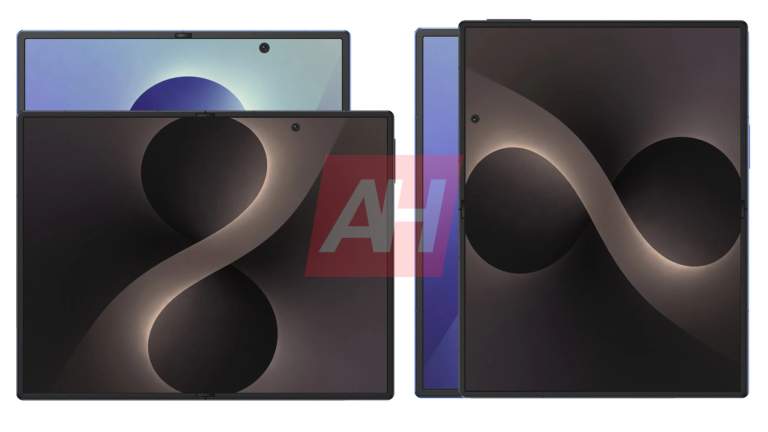
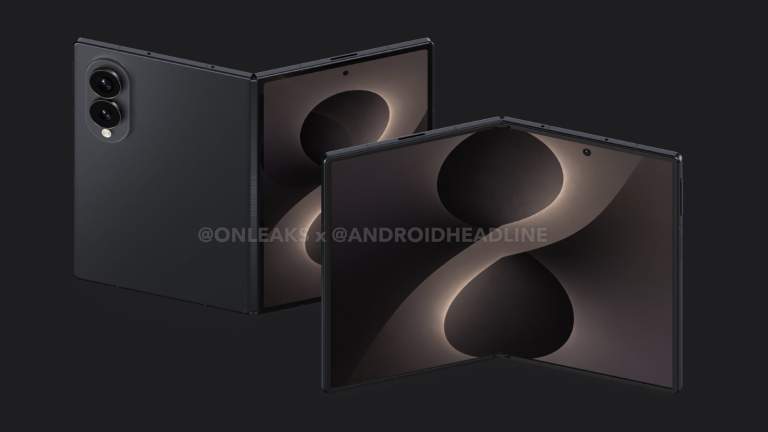
    Samsung is rumored to be preparing a wider Galaxy Z Fold phone for this year’s foldable launch. By “wide,” we simply mean that it’ll look closer to the original Pixel Fold than the current Galaxy Z Fold 7. Instead of a candybar-style device that unfolds into a square tablet, it would start as a wider device in phone form before unfolding into a very wide tablet.

    This week, early builds of Samsung’s upcoming One UI 9 found their way on the internet and people started digging through the files. Within those files, animations of a foldable with a much wider profile were spotted and shared. You can see one of those animations below.

    Galaxy Z Fold 8 WIde

    You’ll notice that it showcases a wider cover display and tells you to swipe up to access widgets or the home screen. From there, the device opens into its wide tablet form, where you can see content taking up a potentially massive tablet. Well, since we don’t know dimensions, that’s pure speculation, as Samsung could always give us a more compact form factor that is simply a wider shape when unfoldable.

    And if you are thinking this is all nothing, I’ll just say that Samsung doesn’t typically include animations like this within their software if it doesn’t represent a device on some level. We’ve seen these One UI animations surface for previous devices and they are often a glimpse into the future.

    Nothing else is really available here other than whatever we can see within this animation, but it is a good sign that Samsung is working on a new form factor for the Galaxy Z Fold line-up. I cannot wait to see where this goes.

    Thoughts?

  • Google Photos Gets a Fresh New Design

    Google Photos Gets a Fresh New Design

    Opening Google Photos on an iPhone this morning showed us an upcoming design change that could land on Android in the near future. Google appears to be readying a new bottom bar that takes on some style ideas from Apple’s newest design language, without bringing in that awful glass aesthetic.

    In the latest Google Photos update on iOS (v7.63.0), you’ll notice a floating bottom bar for navigation within the app towards the bottom area. This new bar still contains shortcuts to Photos, Collections, and Create, they just live inside of a floating pill now. Another tweak is a separation of the search button into its own floating circle off to the right of the main navigation pill. On Android, all of those options are together in a pinned bar at the bottom of the app.

    Google Photos - New Design

    iOS vs. Android

    Google seems to have mostly limited the changes for this new navigation bar to the main tabs, as entering a photo or some other areas of the app switch back to that old style pinned bar with options or lack one entirely. This all appears to be the beginning of this transition to a floating navigation bar or floating action bar. You can see in the image to the bottom right, where all of the action buttons in a photo are as they were previously and the new floating bar is gone.

    Google Photos - New Design

    When Apple introduced iOS 26 last year, they also introduced their new Liquid Glass design. This design does indeed bring a touch of frosted glass to a bunch of their apps and it’s mostly horrible. However, as a part of that big design change, they started putted most action items or menus at the bottoms of apps. This turned into a floating navigation bar or search bar, with separation for things like search, just as Google is doing here. Thankfully, Google has at least not adopted that glass styling and is keeping it Material instead.

    Since this is happening on iOS first, there’s always a chance that Google doesn’t bring this same idea over to Android. However, it’s such a cleaner and more modern look than what the Android version currently has. This feels updated and new and yet still includes all of the functionality from before.

    If it shows up on Android, we’ll let you know.

  • T-Mobile Will Start Doing Live Translation of Calls

    T-Mobile Will Start Doing Live Translation of Calls

    T-Mobile announced this week that it has a new AI-powered feature on the way that’ll translate calls for its customers on their network. Rather than needing a device to do a similar translation (like a Pixel 10 does), T-Mobile wants any phone to be able to experience live translations when needed.

    Because this is the year 2026, T-Mobile wants you to know that they have embedded real-time AI services into their network that will handle these live translations. The feature is actually called T-Mobile Live Translation and it’ll be able to translate calls in over 50 languages.

    Again, this is all happening when you call someone over the T-Mobile network and could work with something as ancient as a flip phone up through the latest in smartphones. The requirement here is that you are a T-Mobile postpaid customer and are making calls through their network that will handle everything. It sounds impressive enough, right?

    T-Mobile Live Translation Beta Registration

    To start, T-Mobile is opening this up to postpaid customers through a beta registration process. This spring, they’ll invite some of those registrants to participate.

    For those users who are invited, you’ll activate T-Mobile Live Translation by entering a call and then dialing *87*. Once active on a call, the translations should just happen without the need to select a language. The voices that are translated may even attempt to sound like you, sort of like how they do on Pixel phones now. T-Mobile didn’t confirm that, but in a promo video for the service it somewhat suggests it’ll attempt a voice match.

    This will cost nothing during the beta, but you can bet that T-Mobile plans to charge at some point. Companies like T-Mobile don’t invest in network technology without making their customers pay for it down the road.

    Register here for T-Mobile Live Translation

  • Pixel 10a Renders Show Flush Backside, Full Color Lineup

    Pixel 10a Renders Show Flush Backside, Full Color Lineup

    We have already seen a few Pixel 10a renders, but as we have gotten closer to a launch day, the quality of said renders has increased. Early renders usually start out as 3rd-party CAD renders, then renders from the OEM get leaked but they are low-res and don’t offer a lot of detail. This week, we have what appear to be full-res renders straight from Google, showing all of us the different angles and colors of the upcoming device.

    Thanks to @evleaks, we can say almost definitively that the Pixel 10a hardware is improved from the Pixel 9a, mainly due to the flush backside. Last year, the Pixel 9a had a slight camera bump, but in 2026 that appears to have been resolved entirely. It looks super flat from the side. The only hardware thing that doesn’t appear to be improved is the display’s bezel on the frontside. It’s still very large and very noticeable.

    As for the color options, we’re going 10/10 here. They look awesome. We have a red, blue, an off-white minty color, and black. We’re still awaiting official names from Google, but again, we think they look very good.

    February 18 is Google’s official launch date for the Pixel 10a, which is coming right up. Anyone planning to snag one of these new Pixels? If so, which color has caught your eye?

    // @evleaks

  • Android 17 Beta 1 Not Releasing Today

    Android 17 Beta 1 Not Releasing Today

    We already updated our post on today’s Android 17 Beta 1 launch, but wanted to make sure everyone was aware and to also know that they could stop refreshing or checking for updates. Google informed us that Android 17 Beta 1 will no longer arrive today.

    Instead, Google says the release of Android 17 is now “coming soon.” We do not have a new release date, but will let you know the minute we have it.

    What should we do today instead?