Category: Featured

The best of the best here at Droid Life.

  • Google Sends First Big Update to Android XR and Galaxy XR With PC Connect, More

    Google Sends First Big Update to Android XR and Galaxy XR With PC Connect, More

    Google finished hosting the latest in “The Android Show” today and the topic at hand was Android XR. We knew this show was coming and there was some excitement around it since we just finished testing the Samsung Galaxy XR in the offices. We’re eager to see where Google plans to take the platform, if new features could bring us back, and if new partners or form factors could soon be joining the fun.

    Here’s what we learned from this latest episode on Android XR.

    GALAXY XR UPDATES: The first Galaxy XR updates are starting to rollout today with a new PC Connect feature, a “travel mode,” and a Likeness feature of yourself.

    For the PC Connect, this is arriving in beta and it will allow you to link your Windows PC to your headset. Previously, Galaxy XR could only connect via Steam VR or if you happened to have a Galaxy Book computer. This sounds like a more general connection where you can pull in your desktop or a window from your computer and then run it side-by-side with apps from Google Play and the Galaxy XR.

    A new “travel mode” is also on the way for when you are on a plane or some other moving vehicle. This mode will allow your viewing experience in Galaxy XR to stay stable even as you move.

    And finally, Likeness is a “realistic digital representation of your face” within Galaxy XR that will mirror your facial expressions and hand gestures in real time. The point of this is to have a digital version of you during video calls. It sounds creepy, but it could be cool? Maybe? This feature starts rolling out today as well.

    Android XR PC Connect

    Android XR Likeness

    NEW INFO ON AI GLASSES AND WIRED XR: The Galaxy XR updates weren’t all that Google shared today. They also gave us a brief update on AI glasses, as well as their upcoming wired XR glasses.

    For the AI glasses that most of us are interested in, Google said that they are continuing to build with their partners (Samsung, Gentle Monster, and Warby Parker) and are working on two types of AI Glasses. The first is is a pair made for screen-free assistance. These are the glasses you’ll where on the daily to talk with Gemini, listen through speakers, take pictures with cameras, and get help, all without any screens. The other type are display AI glasses where you’ll have a small display within that can show you helpful info, like navigation or translations.

    Google said to expect AI glasses next year.

    Project Aura Wired XR

    When it comes to Wired XR glasses, Google shared today a first look at Project Aura from XREAL. These glasses were first revealed in May and we knew almost nothing about them. Today, Google showed off their “blend of headset-like immersion and real-world presence” in what should be a much more portable form factor than something like the Galaxy XR.

    The Project Aura Wired XR glasses will feature a 70-degree field of view and optical see-through technology to try and layer digital content directly onto your view of the physical world. The thought is a portable way to take entertainment with or to do something more practical, like view a floating recipe while you cook. Unlike Galaxy XR, these mostly look like a pair of glasses, they just happen to be wired, so that they can last a long time with a bigger battery in your pocket.

    // Google

  • Samsung Launches One UI 8.5 Beta on Galaxy S25 Ultra

    Samsung Launches One UI 8.5 Beta on Galaxy S25 Ultra

    The signs suggesting that Samsung was about to release One UI 8.5 in some form were there, like this massive changelog and a never-ending series of leaks. Today, they went ahead and confirmed its launch, at least in beta form.

    Owners of the Galaxy S25, Galaxy S25+, and Galaxy S25 Ultra can join the One UI 8.5 beta program through the Samsung Members app and test all that is new before it goes stable, likely when the Galaxy S26 launches early next year.

    As for what’s new in One UI 8.5, you can click that link above with the massive changelog to get all of the small details in a lengthy list. In terms of what Samsung wants you to know, they shared the following new features:

    • Photo Assist: Users can now keep generating new images without interruption with Photo Assist. Previously, you had to save each iteration, but now you can just keep going and then view an edit history to pick from favorites.
    • Quick Share: While not sharing with iMessage, Samsung has said that Quick Share now recognizes people in photos and proactively suggest sending to them.
    • Audio Broadcast: Users can now broadcast their voice using their Galaxy phone’s built-in microphone through LE Audio-supported devices using Auracast.
    • Storage Share: The My Files app can now show files from other Galaxy devices in your ecosystem, so that means doing things like pulling up files from your phone on your Samsung TV.
    • Theft Protection: There are clearer controls over security features in One UI 8.5, plus there’s new features like Failed Authentication Lock that will automatically lock a screen if too many failed attempts to verify identity.

    And that’s all that Samsung is highlighting for now, but seriously, the official changelog has a couple of dozen changes to look through.

    Need instructions for signing up for One UI 8.5 beta? These should work.

    // Samsung

  • Samsung Pulls Out Galaxy S25 Ultra Deal I’ve Never Seen Before

    Samsung Pulls Out Galaxy S25 Ultra Deal I’ve Never Seen Before

    Even with last weekend well behind us, there are still Cyber Week deals to be had through places like Samsung. They appear to be getting more inventive with their offers too, as the Galaxy S25 Ultra deal currently running is one we haven’t seen before.

    $700 OFF WITH TRADES: That mind, trade-ins get you the biggest discounts, up to $700 off. Devices like the Galaxy S24 Ultra will get you the full $700 off instantly, but you’ll want to head to Samsung’s site (here) to check your trade value. There’s a good chance it’ll be worth more than $500.

    With a top trade-in, you could pay as little as $599 today for the 256GB version. Again, trade-ins with Samsung is almost always the way to go.

    $385 OFF GALAXY S25 ULTRA, 512GB UPGRADE: However, while we almost always suggest you try to trade-in a device through Samsung to get the best deal, Samsung also does promos where they’ll shave off hundreds of dollars without a trade. If you don’t have a top device to give them, then times like these are when you pounce.

    For this week, Samsung has slashed $385 off the Galaxy S25 Ultra with 512GB storage. I’ve never seen this promo before. So not only are you getting an upgrade in storage, the price ends up dropping far below the 256GB model. Typically with a storage upgrade, Samsung just drops the price to where the lower storage version sits, but they didn’t this time – they went lower. Without a trade, you could buy the 512GB Galaxy S25 Ultra for $1,034.99. That’s not bad.

    EXCLUSIVE $940 or $545 OFF DEAL: Now, with both of those deals in mind, I’m also seeing a promo that is likely cached in my browser that drops up to $940 off with trade or $545 off without trades. I have no idea how to replicate this, as the Samsung store simply says “Save up to $940 with exclusive offers, only for you.”

    The deal is a combination of instant trade or no-trade discounts, plus storage upgrades. I’ll show you below what they look like, but you’ll have to head to Samsung’s site to see if the deal is also applied for you.

    Samsung Deal Link

    Samsung Exclusive Deals

  • Google Added 9 Sweet New Features to Your Pixel in Big Update

    Google Added 9 Sweet New Features to Your Pixel in Big Update

    Following the release of several beta builds over a number of months, Google released Android 16 QPR2 today in stable as the December Pixel update. This is a huge update with over 30 bug fixes, but it also marks the release of the second major Android 16 build in the same year, something that Google promised to do in 2025. Because of the size of the release, this update includes several new features that are much more than just an advertisement for a movie.

    Google has previewed a number of these new features through beta builds, but today everything goes official for everyone. Things like AI-powered notification summaries, a new notification organizer, custom icon shapes and themed icons, an expanded dark theme, and a bunch of new parental controls are all here. Again, we knew they were coming, it’s just that this is official and ready for your Pixel phone.

    This new Android 16 QPR2 update is available for the Pixel 6 and 6 Pro, Pixel 6a, Pixel 7 and 7 Pro, Pixel 7a, Pixel 8 and 8 Pro, Pixel 8a, Pixel 9, Pixel 9 Pro and 9 Pro XL, Pixel 9 Pro Fold, Pixel 9a, Pixel 10, Pixel 10 Pro and 10 Pro XL, Pixel 10 Pro Fold, Pixel Fold, and Pixel Tablet.

    Android 16 QPR2 Features

    As for the feature list, here’s how Google describes all that is new:

    • AI-powered notification summaries condense longer messages and group chats, giving you quick understanding and context at a glance.
    • Notification organizer automatically groups and silences your lower-priority notifications (such as promotions, news, and social alerts), making it easier for you to stay focused on what matters with fewer distractions.
    • Custom icon shapes allow you to express your style for your device’s home screen.
    • Themed icons are automatically applied across your apps for a more cohesive and minimal look. This creates a more consistent look and feel across all your apps.
    • The expanded option in dark theme automatically darkens most light apps, even those that don’t have their own native dark theme. Dark theme helps save battery and is easier on your eyes.
    • Set the amount of screen time that can be spent on a device each day to help establish healthy habits
    • Set downtime schedules to automatically lock the device at night to ensure restful sleep without distraction
    • Control app usage by limiting time spent on specific apps, or blocking apps entirely
    • Add more time by granting extra minutes when a time limit is reached, or to extend a scheduled break

    Android 16 QPR2 Parental Controls

    And there you go. Go grab that update by heading into Settings>System>Software updates>System update.

    // Google | Android Developers

  • December 2025 Android Security Update Available for Google Pixel Devices

    December 2025 Android Security Update Available for Google Pixel Devices

    Google released the December Pixel update today that also happens to be Android 16 QPR2, which we’ve all been testing for several months. In fact, if you joined the QPR2 Beta early, you have had this software since August. This is a large update that touches the Pixel 6 up through the new Pixel 10 series. Yes, the Pixel 6 is finally getting a fresh update.

    The update will rollout as early as today under several build numbers that we have included below. There will be at least 32 noteworthy bug fixes in the build as well, since this is a quarterly update. Unlike last month’s update that was technically a Pixel Feature Drop alongside a security patch, this one is actually big and contains several changes that you’ll notice and doesn’t include an advertisement for a movie.

    We have a full write-up on all of the 9 new Pixel features here.

    Global
      • Pixel 6:                  BP4A.251205.006
      • Pixel 6 Pro:           BP4A.251205.006
      • Pixel 6a:                BP4A.251205.006
      • Pixel 7:                  BP4A.251205.006
      • Pixel 7 Pro:           BP4A.251205.006
      • Pixel Tablet:         BP4A.251205.006
      • Pixel Fold:             BP4A.251205.006
      • Pixel 8:                  BP4A.251205.006
      • Pixel 8 Pro:           BP4A.251205.006
      • Pixel 8a:                BP4A.251205.006
      • Pixel 9:                  BP4A.251205.006
      • Pixel 9 Pro:           BP4A.251205.006
      • Pixel 9 Pro XL:      BP4A.251205.006
      • Pixel 9 Pro Fold:   BP4A.251205.006
      • Pixel 9a:                BP4A.251205.006
      • Pixel 10:                BP4A.251205.006
      • Pixel 10 Pro:         BP4A.251205.006
      • Pixel 10 Pro XL:    BP4A.251205.006
      • Pixel 10 Pro Fold:  BP4A.251205.006
    EMEA
      • Pixel 9:                    BP4A.251205.006.A1
      • Pixel 9 Pro:             BP4A.251205.006.A1
      • Pixel 9 Pro XL:       BP4A.251205.006.A1
      • Pixel 9 Pro Fold:    BP4A.251205.006.A1
      • Pixel 10:                  BP4A.251205.006.A1
      • Pixel 10 Pro:           BP4A.251205.006.A1
      • Pixel 10 Pro XL:     BP4A.251205.006.A1
      • Pixel 10 Pro Fold:  BP4A.251205.006.A1
    Japan
      • Pixel 9a:                  BP4A.251205.006.C1
      • Pixel 10:                  BP4A.251205.006.C1
      • Pixel 10 Pro:           BP4A.251205.006.C1
      • Pixel 10 Pro XL:     BP4A.251205.006.C1
      • Pixel 10 Pro Fold:  BP4A.251205.006.C1
    Verizon
      • Pixel 9a:                  BP4A.251205.006.B1

    Again, Google (and its carrier partners like Verizon, T-Mobile, and AT&T) will begin pushing these updates over-the-air shortly (Settings>System>Software updates>System update), but if you don’t want to wait for Google and prefer to update manually, you will soon find each factory image or OTA file at the links below. For instructions on how to flash a factory image, here you go. For instructions on how to flash an OTA .zip file, here you go.

  • Samsung Makes Galaxy Z TriFold Official, US Launch Set for Early 2026

    Samsung Makes Galaxy Z TriFold Official, US Launch Set for Early 2026

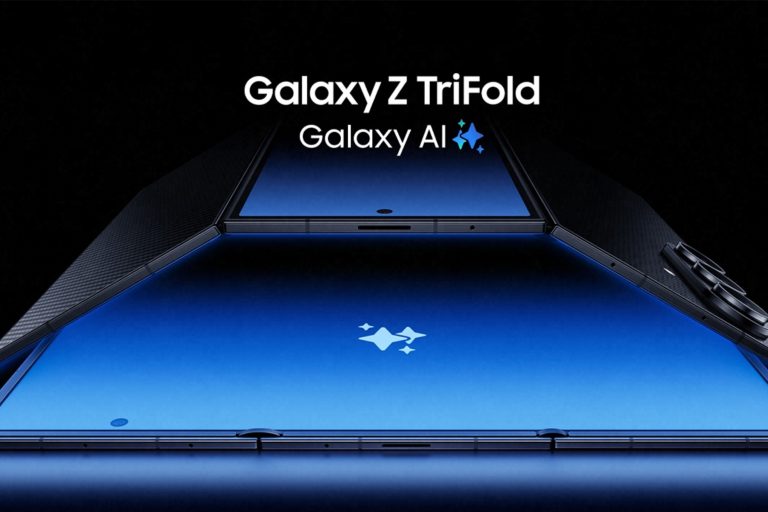
    Samsung is doing it, folks. After a recent leak that detailed the name, Samsung has gone ahead and made it all official: Galaxy Z TriFold is inbound.

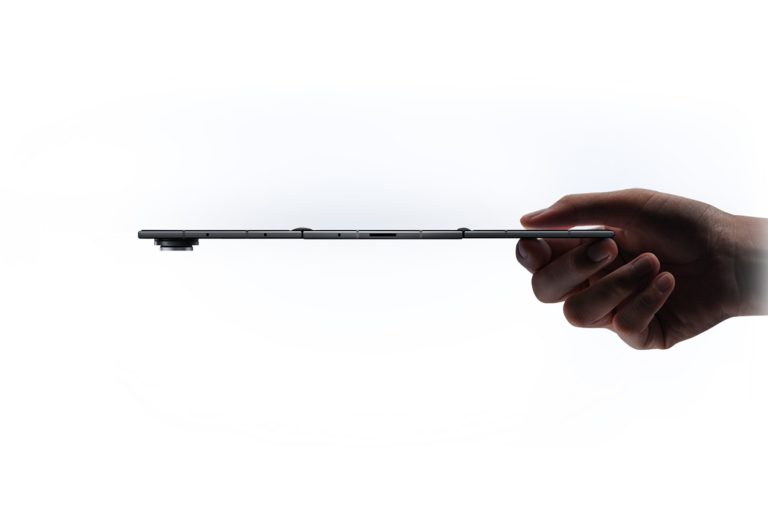
    Set for release on December 12 in South Korea, followed by other markets (including the US) in Q1 of 2026, think Galaxy Z Fold 7, but with an additional screen for your unfolding pleasure. Measuring in at an impossible 3.9mm thick (at its thinnest point), when fully unfolded, Galaxy Z TriFold features a 10-inch QXGA+ display (2160 x 1584, 120Hz refresh rate), with a peak brightness of 1,600 nits. The cover display, measuring at 6.5-inches, is capable of 2,600 nit peak brightness.

    Other specs include a Snapdragon 8 Elite chipset (3nm), 16GB RAM, 512GB base storage, 5,600mAh battery (Samsung says its largest battery in a foldable), Super Fast Charging at 45W when wired, an IP48 rating, weight of 309 grams, and Android 16 (One UI 8) at launch.

    Galaxy Z TriFold will feature three cameras. Unlike the first iterations of the Galaxy Z Fold lineup, we don’t have to wait for Samsung to put in a good camera system. At launch, Z TriFold will feature a triple system, with the highlight being the 200MP wide-angle camera premium Galaxy owners are already accustomed to. There’s also a 12MP ultra-wide camera and 10MP telephoto camera. On the front you’ll find a 10MP selfie camera.

    Galaxy AI and Gemini will be prevalent on the device. Buyers will receive a free six months of Google AI Pro, have access to things like Generative Edit, Sketch to Image, and Side-by-Side Preview. Samsung DeX will be onboard, plus Second Screen and Extended Mode for flexible use cases.

    For hardware, Samsung stresses the hinge system and display itself. I’ll let them explain what they’ve done.

    • Samsung’s Most Advanced Hinges Yet: Drawing on its heritage in foldable phone innovation, Samsung refined the Armor FlexHinge to meet the unique demands of Galaxy Z TriFold. Two differently sized hinges with a dual-rail structure work in harmony, creating a smoother, more stable fold despite varying weight and components across the device. The hinge structure also allows the screen panels to meet securely with a minimal gap, enabling the device to be thin and portable.
    • Restructured Foldable Display: Galaxy Z TriFold introduces new display technology made for the 10-inch screen that folds twice into a pocketable phone. A reinforced overcoat has been added to a shock-absorbing display layer for better resistance across the dual-folding device.

    Samsung has not shared US pricing yet, but we can assume it’s going to be very expensive. If one fold of a screen costs $2,000, two folds can’t be cheap, right? Samsung will have dedicated hands-on experiences for the device at launch, with availability very limited to “select retail stores.” As we get closer to US launch, we’ll undoubtedly learn exact pricing and availability details.

    Galaxy Z TriFold arrives in the US in Q1 2026. Who’s pumped for this?

  • Android XR Event Scheduled for December 8

    Android XR Event Scheduled for December 8

    Google has set the date for a new Android XR event through the latest episode of “The Android Show,” likely where the company will unveil either its own eyewear or possibly a set of Android XR-powered glasses from partner brands.

    The event will take place virtually on December 8 at 10am Pacific (1pm Eastern). Google says, “From glasses to headsets and everything in between, get ready for the latest on Android XR.”

    December 8 is one week away. Mark your calendars, Android XR fans.

    // Google

  • You Can Now Force Gemini Upgrade on Google Smart Speakers

    You Can Now Force Gemini Upgrade on Google Smart Speakers

    If you’re like me, you have been patiently waiting for Google to push the Gemini upgrade to your compatible Google Home device. This morning, there’s now a way to force the update and it’s not difficult at all.

    To get started, users plug in a URL into Chrome on their mobile device, which will then open the Google Home app. Essentially, you’re kickstarting the upgrade, with the setup process containing a few acknowledgments, as well as having users choose which voice they want to interact with. I’ll be honest, the setup is so quick and simple, I almost expected a bit more of a sendoff for Google Assistant.

    Plug this into your mobile Chrome browser to begin.

    googlehome://assistant/voice/setup

    Once setup is complete, Gemini is ready for use on your compatible Google Home speakers. I’ve tested it already, and yes, it’s amazing. Plus, it’s much snappier when working with home controls.

    RIP, Google Assistant.

    // 9to5Google