Category: Apps

The latest selection of Android apps, both free and paid, are found right here. If you were looking for that fresh list of trending Android apps, we have you covered on a daily basis. Want to know the newest Android application releases first? Want to know which Android applications are free for a limited time?

Whether it’s Gmail, Google Calendar, Twitter, YouTube, and Instagram, or lesser known apps like Nova Launcher, Trello, Sling TV, and Philips Hue, you will know the best Android apps at all times.

Got a suggestion for a new app you think we should check out? We are all ears and regularly accept user-submitted applications, so that you won’t pay until you know if we approve.

  • Oura Ring App Gets Big Facelift, AI Gets More Access to Your Metrics

    Oura Ring App Gets Big Facelift, AI Gets More Access to Your Metrics

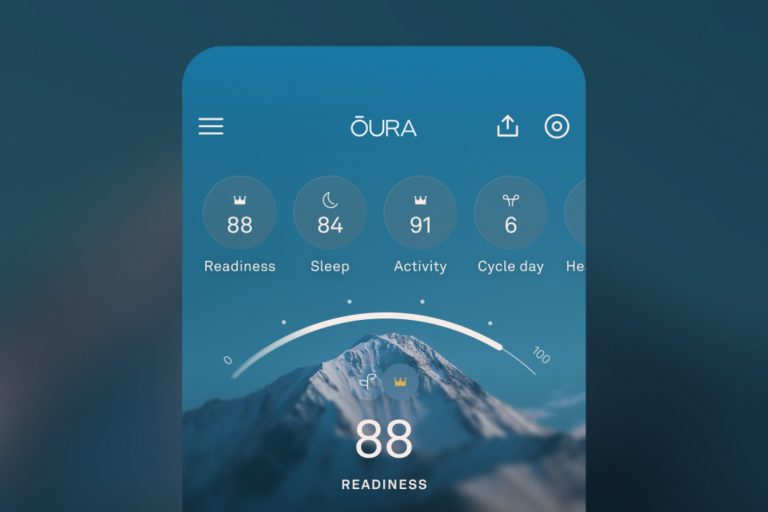
    Oura is introducing a redesigned app for its smart ring owners this week, but it goes beyond just a standard facelift. Oura is also opening up its AI, Oura Advisor, to more of your metrics to ensure you’re getting the most out of your ring.

    Moving forward, Oura Advisor will have access to more of your data including sleep trends, activity changes, and even dietary insights from Meals. Oura says users can now ask Advisor to analyze new Habits and Routines in My Health or work with Advisor to create a plan to reach targeted health goals.

    The Today tab is still present and your main, “source of truth for making smart daily choices.” A lot of the clutter has been cut back, instead showing you your most important score and a quick snapshot of your body’s readiness levels, along with any unusual metrics the app might notice.

    When detailing the changes to the Vitals section, users will notice different colors to help highlight the body’s different states according to your own biometrics. This should allow for an immediate signal of how you’re doing each day.

    Oura made the below video to showcase the changes the app. Overall, it looks super slick.

    Google Play Link

    // Oura

  • Google Adding New Sideload Process for Unverified App Installs on Android

    Google Adding New Sideload Process for Unverified App Installs on Android

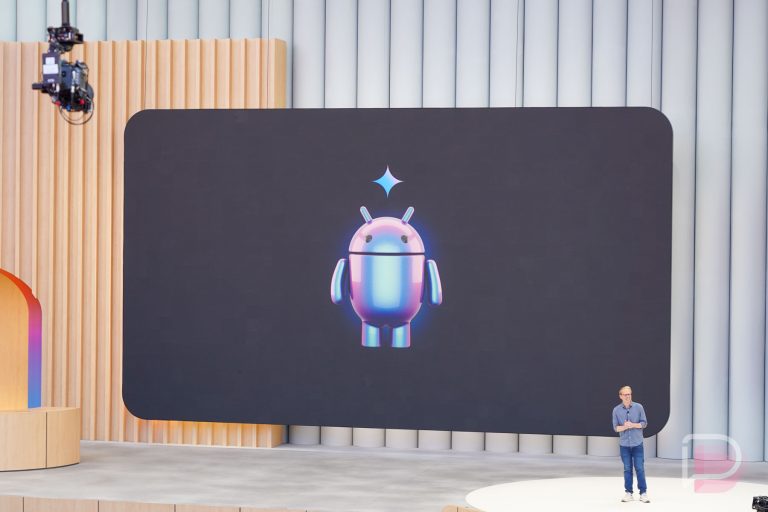
    Back in August, Google announced that it would soon require developers to verify before their apps could be installed on your Android device if you tried to install them outside of Google Play. Another way to look at the situation would be Google blocking you from sideloading apps, assuming they were from a developer who had not yet verified with Google. Whichever way you look at it, the decision has not be met with enthusiasm from everyone in the world of Android.

    Today, Google is stepping back some from being so heavy-handed in this verification approach. They announced that they are working on a new advanced flow that would allow “experienced” users or those “who have a higher risk tolerance” to still sideload apps from unverified developers. This process would have them accept the risks, help resist coercion and reduce folks from being tricked into bypassing safety checks, etc.

    Here’s more on this idea:

    While security is crucial, we’ve also heard from developers and power users who have a higher risk tolerance and want the ability to download unverified apps.

    Based on this feedback and our ongoing conversations with the community, we are building a new advanced flow that allows experienced users to accept the risks of installing software that isn’t verified. We are designing this flow specifically to resist coercion, ensuring that users aren’t tricked into bypassing these safety checks while under pressure from a scammer. It will also include clear warnings to ensure users fully understand the risks involved, but ultimately, it puts the choice in their hands. We are gathering early feedback on the design of this feature now and will share more details in the coming months.

    Google says they are only in the early stages of the design of this new sideloading feature and plans to share more in the coming months.

    As a reminder, all of this sideloading and verification stuff has nothing to do with developers who distribute through Google Play, as they have to be verified in order to do so.

    // Android Developers

  • Google App Gets Images Tab and Way to Organize Interests

    Google App Gets Images Tab and Way to Organize Interests

    The Google App is getting an update that will add a new Images tab to the bottom. This area will be used as a gathering place for images you’ve found while searching Google that you may want to save and also as a place for you to discover images of things you are into.

    Google envisions a world where you visit the Images tab daily, browse through images of your interests, and then potentially save them into collections to access whenever or to keep adding to. You can see how this will all look below, with a familiar Images layout, little bookmark buttons to save items, and ways to create new or add to collections.

    Google Search - Images Tab

    This new Images tab will rollout over the “next few weeks” on Android and iOS in the US.

    Google Play Link: Google App

  • Google Play About to Warn You If Apps Cause Excessive Battery Drain

    Google Play About to Warn You If Apps Cause Excessive Battery Drain

    Google has defined a new bad behavior threshold for excessive wake locks on Android, which means a new warning is coming to apps on Google Play if they might present excessive battery drain. The time has come for developers to stop messing around in the background on your device and killing your battery.

    The Android Developers team shared a write-up on the new threshold this week, saying that come March 1, 2026, they may take some action against developer apps or at least begin warning end users (like you and I) if an application might put a strain on their battery. This new metric was created in collaboration with Samsung and is now a part of the core vitals metric for developers to meet on Android.

    Here’s how Google shared the news:

    We have defined a bad behavior threshold for excessive wake locks. Starting March 1, 2026, if your title does not meet this quality threshold, we may exclude the title from prominent discovery surfaces such as recommendations. In some cases, we may display a warning on your store listing to indicate to users that your app may cause excessive battery drain.

    The full write-up on this new threshold can be found at the link below, but the basics are that Google now considers an excessive amount of wake locks to be more than 2 cumulative hours within a 24 hour period. That said, there are some exemptions here, if an app can somehow prove that its wake locks offer “clear user benefits that cannot be further optimized” – like audio playback and user-initiated data transfers.

    So there you have it on excessive battery drain from wake locks in the background of your phone. If developers don’t meet the new bad behavior threshold, Google will take action against them.

    // Android Developers

  • AI Editing on Google Photos Gets Improved, New ‘Ask’ Button Introduced

    AI Editing on Google Photos Gets Improved, New ‘Ask’ Button Introduced

    Google Photos has been a primary beneficiary from the Gemini revolution. Editing photos however you want with the help of Gemini has been great, but Google isn’t done improving the service with AI. There are a bunch of new features now rolling out on Android, plus iOS is also getting some love.

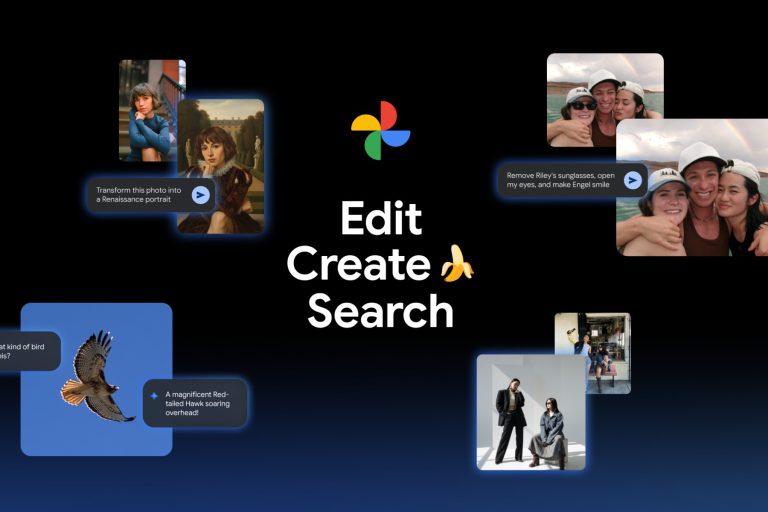
    Thanks to Nano Banana, personalized edits with the “Help me edit” tool using your own private face groups are now available. For example, you can tell Gemini to, “Remove Kellen’s sunglasses, open my eyes, make Julia smile and open her eyes.” With this, the photo that isn’t quite right can now be honed into a perfect shot. Google also announced that this feature is now coming to iOS.

    Google Photos - Help Me Edit

    A new Create tab will have AI templates available, such as, “put me in a high fashion photoshoot,” “create a professional headshot” or “put me in a winter holiday card.” Personalized templates will also be available in the coming weeks. Google describes Gemini using insights about you from your gallery to create edits based on your hobbies and experiences. For example, “create a name doodle personalized to me,” or “create a cartoon of me and my hobbies.”

    The Create tab will be available first in the US and India, with rollout expected to begin next week.

    For those wanting to dive deep into an image, a new Ask button is also getting introduced. Rolling out now to Android and iOS, when viewing an image, you can start a conversation instantly to get answers about its content. Users can discover related moments (similar images) or simply describe edits they want and watch the changes appear in seconds, all thanks to Gemini.

    Be on the lookout for all of these new goodies in Google Photos.

    // Google

  • YouTube TV Gives Out $20 Credits Because of Disney Loss

    YouTube TV Gives Out $20 Credits Because of Disney Loss

    The YouTube TV and Disney situation has improved in one way since we entered this past weekend without a deal in place. Google is issuing $20 credits to subscribers as a way to soften the blow of another string of days without all of the content provided by Disney, ESPN, and ABC.

    An email went out over the weekend saying that Google has “been working in good faith to negotiate a deal with Disney” and that it has been “disappointing to lose Disney content.” Because they “deeply appreciate” your business patience, they are offering subscribers a $20 credit that can be applied to future bills. That credit is now available for you to claim if you happen to pay the enormous monthly fee that comes with a YouTube TV subscription.

    To claim your $20 YouTube TV credit, you’ll head to tv.youtube.com/settings/service_updates and make sure you are logged-in with the associated Google Account of yours for YouTube TV. From there, you should be able to click a couple of buttons before seeing a “You’ve successfully claimed your $20.00 credit” message. Google plans to apply that credit to your next bill.

    YouTube TV Disney Credit

    Again, there is no deal in place and the two companies have been going at it publicly, even calling each other out for leaking information to press to create a narrative that paints one side in a bad light. It has actually been a lot messier than most of these public negotiations, with YouTube TV even calling out the most recent internal memo from Disney that surfaced as a form of “negotiating in public through their paid talent and misrepresenting the facts including from the deals they’ve offered and taking credit for our product proposals.”

    It’s messy and not fun at all for those who want to watch sports.

    We’ll let you know once a deal has been reached for Disney and YouTube TV.

  • Samsung Adds iFIT Workouts to Samsung Health and Galaxy Watches

    Samsung Adds iFIT Workouts to Samsung Health and Galaxy Watches

    Samsung added workouts to Samsung Health and the Galaxy Watch line-up that are powered by iFIT.

    For those not familiar with iFIT, think of it a bit like a Peloton-esque service, with fitness classes provided by trainers for all sorts of workout types. You can find workout sessions for everything from HIIT to pilates, yoga, strength training, recovery, and mindfulness. Of course, it does cost monthly to subscribe to, but Samsung is at least giving you a free class every month to access.

    Like other workout services that pair with Samsung Health, activating a workout from the watch will show live metrics on your Samsung device, including heart rate, session duration, calories burned, etc. You’ll find iFIT within the fitness tab of the Samsung Health app.

    iFIT costs $9.99 per month or $99.99 per year, which gets you “hundreds” of videos and new workout content on an ongoing basis, Samsung suggests. You can find discounts on that subscription if you purchase new devices, including 30 days of service with a Galaxy smartphone, 3 months free with Galaxy Buds 3 Pro purchases, and 6 months free if you were to buy a Galaxy Watch 8, Watch 8 Classic, or Galaxy Watch Ultra.

    // Samsung

  • ESPN, Disney, and ABC Still Aren’t Back on YouTube TV

    ESPN, Disney, and ABC Still Aren’t Back on YouTube TV

    YouTube TV still doesn’t have Disney, ESPN, or ABC. When will it get those networks back? No one knows at this time, but it looks like we could be waiting for a while, as the weekend is already here without the two sides coming to terms.

    Over the Halloween weekend, my mom hit me up to complain about YouTube TV losing Disney, ESPN, and ABC. I responded pretty quickly with something along the lines of, “This happens all the time and I bet they have an agreement by the end of the weekend.” Boy, was I wrong.

    We’re now a full week into this separation and executives from Disney’s side are signaling that we’ll not have a deal in place. They told staff members in a memo that has “leaked” to dozens of media outlets that “we are headed into another sports-packed weekend without a deal in place.” They also insisted that “YouTube TV continues to insist on receiving preferential terms that are below market and has made few concessions.”

    With this memo leaking, a YouTube TV spokesperson responded by shaming Disney for leaking this memo, saying they were “negotiating in public through their paid talent and misrepresenting the facts including from the deals they’ve offered and taking credit for our product proposals.” They insisted they were “ready to make a fair agreement” and encouraged Disney to “come to the table and do what’s best for our mutual customers.”

    So yeah, Disney, ESPN, and a bunch of other networks still aren’t on YouTube TV after a full week of emptiness in