Category: Apps

The latest selection of Android apps, both free and paid, are found right here. If you were looking for that fresh list of trending Android apps, we have you covered on a daily basis. Want to know the newest Android application releases first? Want to know which Android applications are free for a limited time?

Whether it’s Gmail, Google Calendar, Twitter, YouTube, and Instagram, or lesser known apps like Nova Launcher, Trello, Sling TV, and Philips Hue, you will know the best Android apps at all times.

Got a suggestion for a new app you think we should check out? We are all ears and regularly accept user-submitted applications, so that you won’t pay until you know if we approve.

  • Spotify Raises Prices Outside US

    Spotify Raises Prices Outside US

    Spotify raised prices in the US a little over a year ago and are now following suit across the rest of the world. In a note today, Spotify says that prices will go up across Europe, Latin America, South Asia, and others.

    Spotify price increases: The announcement Spotify today says that billing dates in September will start to see the new price increases. They will likely vary by region, but the example they give is in Euros and shows the price going from 10,99€ to 11,99€ next month.

    The regions listed are South Asia, the Middle East, Africa, Europe, Latin America, and the Asia-Pacific region. If you live in those regions, you’ll see an email from Spotify like the one below that explains your new price and when exactly starts.

    Thank you for being a valued Premium subscriber. Starting on your billing date in September, your subscription price will change from 10,99€/month to 11,99€/month.

    We’re increasing the price of Premium Individual so that we can continue to innovate on our product offerings and features, and bring you the best experience.

    Thank you for choosing Premium.

    The Spotify Team

    Is another US Spotify price increase coming?

    // Spotify

  • Verizon Removes Free Apple Arcade and Google Play Pass Perk From Plans

    Verizon Removes Free Apple Arcade and Google Play Pass Perk From Plans

    As a part of some its older plans, Verizon has included a monthly subscription to Apple Arcade or Google Play Pass at no charge. This was a part of their 5G Get More and 5G Play More plans that were first introduced in 2021 and then renamed in 2022. With their never-ending quest to try and get customers off of those older, actually-good-plans, Verizon has decided to rip away that free perk.

    No more free Verizon Apple Arcade, Google Play Pass: Customers on those older 5G Get More and 5G Play More plans will see a notice at their top of their My Verizon app that informs them of this upcoming change. Those customers will have until September 22, 2025 to use those perks before Verizon discontinues them.

    The text reads, “Effective September 22, 2025 Apple Arcade & Google Play Pass included with your plan will be discontinued.” They don’t offer any other details within the app, but a recently updated support page for the perk confirms that customers need to take advantage of it before September 22 and that it will be removed from their accounts on September 25, 2025.

    These perks were valued at $6.99/mo (Apple Arcade) or $4.99 (Google Play Pass) with customers allowed to choose one or the other.

    Verizon Get More - Apple Arcade, Google Play Pass removal

    This removal of a free perk is just the latest move by Verizon to get customers off of older plans. You may recall that they raised prices on these same plans by $4/mo per phone line in March of last year. It seems only a matter of time before they remove the free Disney+ bundle too.

    It’s getting expensive to stick with the traditional carrier plan in the US. All of those prepaid services look better and better by the day, don’t they?

  • Facer Gets Big Wear OS 6 Update, Promises Better Battery Life Than Ever

    Facer Gets Big Wear OS 6 Update, Promises Better Battery Life Than Ever

    Facer, the Wear OS watch face app downloaded by over 10 million users, announced big changes this week. The big news centers around WFF (watch face format) support on Wear OS 6, battery improvements, many new watch faces, and more.

    The Android development team announced earlier this year that it would be moving towards supporting only the Watch Face Format and removing support for AndroidX / Wearable Support Library (WSL) watch faces, so this move by Facer makes perfect sense. As part of it, Facer highlights both direct syncing of faces from the Facer app to your watch, plus a more intuitive, simplified setup process for Wear OS 6 users.

    Also awesome, Facer says users will experience better battery life than ever. As detailed, “Wear OS 6 users will see significantly improved battery life on all faces, with super-low power consumption on designs marked with the green lightning bolt. Never worry about Facer causing extra drain on your Wear OS watch again.”

    Those looking to brand their watch with a watch face from their favorite IP will also enjoy this news: New watch faces from 100s of IPs, such as Spongebob, DOOM, Atari, Call of Duty, MVMT, NASA, Barbie, Hot Wheels, and more. Personally, the first face I try will be the Spongebob one.

    To check out the new and improved Facer for yourself, have at it.

    Google Play Link

    // Facer

  • Google Home Boss Admits That Google Assistant Sucks on Google Home

    Google Home Boss Admits That Google Assistant Sucks on Google Home

    I don’t know if any of you have stopped through the Google Home subreddit at any point over the past several years, but if you have, you know that it is not a positive space. In fact, most of the threads there are a mixture of complaints and calls for help as features and reliability appear to have tanked.

    Google’s Chief Product Officer for Google Home, Anish Kattukaran, randomly took to Twitter this week to acknowledge to the world that they have heard your feedback about the failings of Google Assistant on Home products. In his post, he “sincerely” apologized for current experiences that folks are having and then committed to getting it all right.

    Kattukaran didn’t go into specifics on how he and his team will do that, but did at least acknowledge that they want to “have a long term solution that provides better reliability and capability.” He also noted that they have been working on “major improvements” and that they’ll have more to share in the fall.

    Google Home Google Assistant Sucks

    My only feedback here is that I feel like someone who has almost completely stopped using all of the Google Home products in my house. I do still rely on the Google Photos feed that scrolls across the displays I have, but that’s it. The Google Assistant was unreliable enough that I just reach for my phone if I need to do anything with an assistant. From getting something as simple as current weather or managing smart home devices, I know my phone can get these things done without a hitch.

    How about you – how has your Google Home experience been going?

  • Google Photos Crazy New Tool Lets You Turn Photos Into Videos

    Google Photos Crazy New Tool Lets You Turn Photos Into Videos

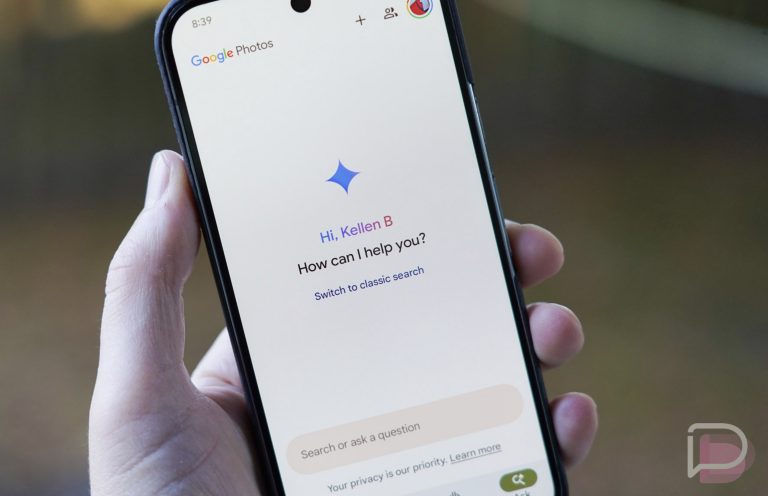
    Google is introducing a couple of new features today within Google Photos that were inevitable, thanks to AI. Whether these are good or bad features is not up for me to decide, although you can probably imagine where I’m leaning. Either way, just know that you’ll now be able to take a photo and have AI make a video out of it. You’ll also be able to “remix” a photo into anime or cartoon or a 3D animation.

    Google Photos new AI tools – Photo to Video, Remix, Create tab: In total, there are actually 3 announcements from Google today. There’s “Photo to Video” and “Remix,” but they are giving us a new “Create” tab too. This will be the place where all of your AI items live, with the potential for more or less tools in the future, depending on how all this goes.

    The new Google Photos “Photo to Video” feature is probably the one to really focus on here, as your imagination goes places with this that maybe our still photos shouldn’t go. Thankfully, that’s not Google’s plan for now. Instead, Google will let you choose a photo and and then pick from two options of “Subtle movement” or “I’m feeling lucky.” These will then create short 6-second AI-generated clips of your photo.

    This new “Photo to Video” feature will begin rolling out as early as today in the US on Android and iOS.

    Google Photos - Photo to Video Feature

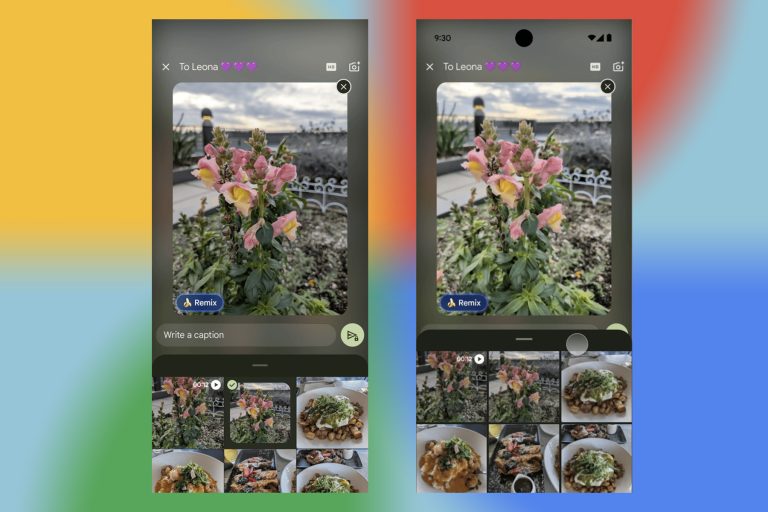
    And then we have “Remix,” which is a feature where you’ll choose a photo and then turn it into a style. Google suggests style choices of “anime, comics, sketches or 3D animations,” though there could be more we aren’t seeing or that will arrive in the future. This is a silly feature that could be fun at times and is mostly harmless. But please, don’t make a wedding photo into a cartoon, share it publicly, and think anyone cares, OK?

    This new “Remix” feature will start rolling out in the US on Android and iOS in the “next few weeks.”

    Google Photos - Remix Feature

    Finally, we have the new “Create” tab that will show up in August in the US. This tab is simply a place for all of your creative-type tools within Google Photos to live. You’ll find the two new features we mentioned above, as well as your collages, highlight videos, and others.

    Google says that they want to bring these tools “responsibly” to the world, so they are adding SynthID digital watermarks to both Remix and Photo to Video creations. They will also try to proactively identify other issues to prevent misuse and want your feedback, so be sure to use thumbs up or down buttons if you like or dislike something their tools create.

    Thoughts?

    // Google

  • Google Starts Gemini Feature Drops, Because Gemini is Life

    Google Starts Gemini Feature Drops, Because Gemini is Life

    Gemini is changing at such a rapid pace that Google has decided it should get more recognition for all the changes that it rolls out. To do so, they are introducing “Gemini Drops,” which are like Pixel Feature Drops, only specific to what’s new in Gemini. I guess that makes sense.

    For this first July Gemini Drop, Google is highlighting 5 items below, most of which we covered in recent weeks. Here’s what Google said about them all:

    • You can now use Veo 3 to transform your favorite photos into dynamic eight-second video clips with sound in the Gemini app.
    • Gemini is now available on all Wear OS 4+ watches, bringing its helpfulness right to your wrist without needing to take out your phone.
    • You can plan ahead with Scheduled Actions. Ask Gemini to provide a summary of your calendar and unread emails every morning when you wake up, for example.
    • Gemini 2.5 Pro, our most intelligent model, is now better at coding, science, reasoning, and multimodal benchmarks.
    • We brought captions to Gemini Live, a highly requested feature, so you can read along as you have a conversation with Gemini.

    And going forward, there is a dedicated Gemini Drops page you can follow (here). You could also just wait for us to tell you what’s new. Whatever you want to do.

    // Google

  • Nothing Updates the Essential Space With 3 Big Improvements

    Nothing Updates the Essential Space With 3 Big Improvements

    The Essential Space is one of the bigger software ideas that Nothing has come up with to try and differentiate its most recent phones. While I’m not sure they have quite executed the space in the right way yet, there is time for improvements to do that. Today, Nothing announced that it is pushing an update with 3 pretty big changes that will certainly help it take a step towards being a useful tool.

    Nothing Essential Space update: For those not familiar, Nothing’s Essential Space is a bit like Google’s Pixel Screenshots app, in that it wants to help organize your digital life on phone. It does so by capturing screenshots (with all of their info) with a press of the Essential Key at any time, but it can also take audio notes, set reminders or create tasks, and record conversations before providing AI summaries. So far, it does all of that with pretty limited success.

    The update for today should help some as it adds Google Calendar sync. This allows all of the tasks you create with a set time to be synced to Google Calendars. The Flip-to-Record sessions in Essential Space can be exported as image, PDF, or Markdown and saved locally. And finally, you’ll be able to edit titles, summaries, and action items in all of your created items in the Space.

    Below, you can see how all of this new goodness should look and work.

    Essential Space Update

    Here’s the full changelog:

    • Google Calendar Sync: All tasks with a set time can now be synced to your Google Calendar .
    • Save & Share: Export any Flip to Record meeting note as Image, PDF, or Markdown and share or save locally.
    • Manual Editing: Edit titles, summaries, action items and more in Essential Space.
    • Stability & Performance: Bug fixes and stability enhancements.

    Google Play Link: Essential Space

  • Chrome’s Bottom Bar on Android has Finally Arrived

    Chrome’s Bottom Bar on Android has Finally Arrived

    It has been almost a month since Google announced that you would soon be able to move the Chrome address bar to the bottom of your app on Android. This week, that change started rolling out widely, a reminder that slow rollouts suck.

    Bottom address bar Chrome for Android: If you have the latest version of Chrome on your Android phone, opening it this week should give you a notice letting you know that the address bar can be moved from top to bottom. I’m currently running Chrome v138.0.7204.157 and the notice showed up within the past day or two.

    For those who missed the news, we’re simply talking about you being able to position the address bar in Chrome at either the top or bottom. That’s it. It has been at the top for years, although we did have a bottom bar known as “Chrome Home” for some time in beta builds. However, that feature was killed in 2018 and we’ve been stuck with a top bar ever since.

    The idea behind a bottom address bar is a basic one – a bottom bar is easier to reach on a big ass mobile phone. Thankfully, Google isn’t forcing this on you, in case you hate change and think a bottom bar looks weird. You can keep your top bar, silly person. For those wanting a bottom bar, all you have to do is long-press on the address bar and it’ll give you options to “Move address bar to the bottom” or “Copy link.” Obviously, you press the “move” option.

    Chrome Address Bar

    Google Play Link: Chrome