Category: Apps

The latest selection of Android apps, both free and paid, are found right here. If you were looking for that fresh list of trending Android apps, we have you covered on a daily basis. Want to know the newest Android application releases first? Want to know which Android applications are free for a limited time?

Whether it’s Gmail, Google Calendar, Twitter, YouTube, and Instagram, or lesser known apps like Nova Launcher, Trello, Sling TV, and Philips Hue, you will know the best Android apps at all times.

Got a suggestion for a new app you think we should check out? We are all ears and regularly accept user-submitted applications, so that you won’t pay until you know if we approve.

  • Google Could Let RCS Finally Come to Your Favorite Messaging App (Updated)

    Google Could Let RCS Finally Come to Your Favorite Messaging App (Updated)

    Google has finally convinced (most) carriers to adopt its Messages app and the RCS or “Chat” service they’ve implemented within it, basically as the default text message app for Android phones going forward. It’s a huge milestone for RCS and one that should help adoption, assuming everyone is cool with Google Messages, knows how to find it, and is OK leaving their other texting apps behind.

    A recently discovered API could take away that last item, should Google decide to let others play with their RCS service. The folks at XDA dove into a freshly updated Google Messages app today and found an Android Messages API (or RCS API) that has the ability to tap into Google’s RCS service from another app.

    Below, you can see the strings that point to this possibility:

    <string name=”external_messaging_api_description”>With this permission the app will be allowed to send SMS/MMS/RCS using Android Messages. It will have an access to send messages without any extra approvals.</string>

    <string name=”external_messaging_api_label”>Permission to send SMS/MMS/RCS messages using Android Messages API</string>

    The idea here is that another text messaging or SMS app could tap into the Android Messages API to allow for RCS or “Chat” messaging from within their app. I’d imagine it would all then be routed through Google’s own RCS service, but it would let users use another app to have some RCS fun. As it currently stands, RCS users are basically forced to use Google Messages.

    Now, with this discovery, XDA states that the Android Messages API is in the Google Messages app on Samsung phones, and that could be because it would allow Samsung users to tap into RCS from the Samsung Messages app too. So it could be a one-off permission made by Google for Samsung. Our hope is that this is more than that, and that Google is planning to open up their RCS implementation to other apps.

    There is a huge ecosystem of 3rd party texting apps and this would help them utilize RCS, which is basically the future of SMS.

    • UPDATE: After digging further, it appears now that this is all not what we hoped. XDA has discovered that this API is basically there for use with Samsung apps and Samsung apps only. Damn.
  • Google Testing New App That Stores Your Medical Records

    Google Testing New App That Stores Your Medical Records

    According to screenshots that have hit the web, Google is internally testing a new Google Health app, dedicated to storing your personal medical records and sharing them should you need to with family.

    From the screenshots posted by 91mobiles, we can see that users would be able to import their medical records and information from past doctor visits. You’d also be able to view lab results. On the bottom of the app, you have your navigational tabs, with options for Records, Contacts, and Sharing available.

    Right now, Google doesn’t have a public app that does these things, so I see how something such as this could be useful. For example, my Kaiser app is pretty tough to use at times. However, I’d also need to see what sort of information Google is collecting from this app’s users. I’m not about to be served ads based on my test results. I’m sure Google will try to be very transparent about privacy when it comes to this app, should it be released.

    Right now, the app appears to be in internal testing and not even fully green lit yet. We’ll keep you posted as we learn more.

    You ready to hand your medical data over to Google?

    // 91mobiles

  • It’s Straight Up Cats and Dogs on Waze Right Now

    It’s Straight Up Cats and Dogs on Waze Right Now

    Announced this morning and here for only a limited amount of time, there’s a new option for animal lovers who want to be directed to their destination in Waze by either a dog or cat. It may not seem practical to have a dog or cat guide you, but somehow, Waze has pulled it off.

    As detailed by Waze, when you select these voices inside of the app, “The dog voice is upbeat, positive, encouraging and excited about wherever you’re going (but also easily distracted), while the cat voice is skeptical, wary, smart, nervous, neurotic, but also weirdly funny and irreverent.”

    That sounds about right.

    In addition, there are new vehicle models to play with, such as the Meow Mobile and the Woof Wagon. If this sounds right up your quirky alley, go download the update and enjoy yourself.

    Google Play Link

    // Waze

  • Google Adds Way to Store Digital COVID Vaccination Card to Phones

    Google Adds Way to Store Digital COVID Vaccination Card to Phones

    You could soon be able to officially store your COVID vaccination card digitally on your phone, thanks to an update Google pushed out today. By updating the Passes API on Android, Google is allowing vaccination and test cards to be stored on Android phones in the near future.

    Using the updated Passes API will allow developers from healthcare organizations, government agencies, and organizations authorized by public health authorities to distribute digital versions of COVID vaccine cards. These digital cards can be stored on phones with a simple shortcut on your home screen that can even be accessed for offline use.

    Google says that COVID digital cards are simply stored on individual devices, so if you want to access it from multiple phones, you would have to manually store it on each. Storing a COVID card on your phone requires that you have a secure lock screen enabled, plus you may have to use a password, PIN, or biometric method to access it.

    Google does not store a copy of this card and will not share it with services, third parties, or for targeted ads.

    In Google’s blog post for this news, they suggest that a COVID vaccine card may be accessed through Google Pay at some point. However, they also made it clear that the app will not be required for cards to be stored on your phone.

    Should providers begin rolling this out, we’ll try to let you know.

    (Of course, you do like many of us and take a photo of your card or scan a copy in Google Drive to be accessed at any time. This is, obviously, more official than that.)

    Google Pay Covid Vaccine Card

  • Telegram Update Adds Super Hot Animated Backgrounds, Group Call Features

    Telegram Update Adds Super Hot Animated Backgrounds, Group Call Features

    Telegram dropped a big time update today to both mobile and desktop platforms that you’ll want to grab right away. For mobile users, you are getting a really fun new background animation feature that adds a nice touch of customization in conversations, plus all platforms are getting new video call goodies.

    Telegram Animated Backgrounds

    Animations!

    For those animations, Telegram is letting you fully customize or choose pre-made animated backgrounds of chats. These animations can have patterns or simply show off colors that Telegram offers. If you want to get really wild with it, you can pick and choose the color setups, add or remove colors, and then share those customized layouts with contacts in Telegram.

    Once you’ve established your background, you can preview the animation from the editor, but then as you send messages, your background will constantly animate and change. It’s a really cool effect that Telegram claims is a first for a messaging app.

    As an added animated bonus, you’ll start to see new animations when you add stickers or emoji, where the item “seamlessly” hops from the keyboard area into your chat. It’s not a huge feature, but certainly a nice touch of polish. Oh, there are new animated emoji too.

    Telegram Group Video

    Group video calls!

    I actually want to hesitate in calling Telegrams video chats “group video calls” because they don’t really work like a traditional video call. Instead, you have to open one of those awful voice chats that people have talked themselves into participating in and then turn on video. It’s very odd and seems like a step too far removed from an easy video call between multiple people. Either way…

    In today’s update, Telegram is letting you easily turn on your video during voice chats to basically create video calls. You should see a video icon during voice chats to enable.

    The update also lets you pin a video, share your screen in these video/voice chats, and enjoy improved noise suppression. For desktops and tablets, Telegram added an optimized side panel and split-screen view too.

    The update is live right away on all platforms.

    Google Play Link: Telegram

  • Microsoft Brings Android Apps to Windows 11

    Microsoft Brings Android Apps to Windows 11

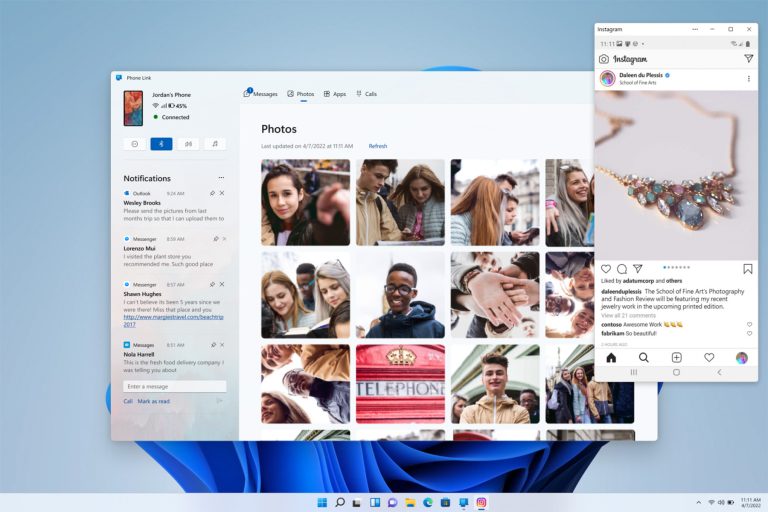
    Microsoft announced Windows 11 today, and look, this is a story we wouldn’t typically pay much attention to around here. However, there is an Android component to the big news and it involves Android apps. Microsoft is bringing your favorite Android apps to Windows and they’ll be super easy to get.

    As a part of the Windows 11 unveiling, Microsoft showed off a new Microsoft Store. In doing so, they announced that there will be a section for Android apps that you will be able to install. If you were hoping this meant some sort of tie-in to Google Play, well, this is where the news gets unfortunate.

    Microsoft is partnering with Amazon and the Amazon Appstore to provide these Android apps to Windows users. My understanding here is that Amazon is providing listings of apps within the new Microsoft Store, but that you’ll still actually get the apps from Amazon. This makes a whole bunch of apps easily available to Windows 11, which is kind of a big deal.

    In a demo on Microsoft’s site, they show the action of finding TikTok on the Microsoft Store, grabbing it from Amazon, and then running it on a Windows 11 build, portrait phone style and all. The show that a bunch of other apps will be there as well, like Khan Academy, Kindle, and others. I’d imagine whatever Amazon has available will make its way to Windows 11.

    Android Apps Windows 11

    As much as I wish they’d find a way to pull in through Google Play, so we could potentially access those catalogs we have accumulated over the years, I’m still loving this. The Windows app selection for software is still mostly garbage after all these years, but having Android apps available could help depending on the need.

    I can’t wait for Windows 11.

  • Spotify Launches Greenroom, Looks About as Boring as Clubhouse

    Spotify Launches Greenroom, Looks About as Boring as Clubhouse

    Because I’m getting old and crusty, maybe I just don’t get it, but apps like Clubhouse do not interest me. What are people talking about that’s so intriguing? There’s no way anything out there is as fun to listen to as the Droid Life Show, so if you really need something to listen to, go enjoy that. With that said, Spotify launched its Clubhouse competitor this morning, called Greenroom.

    If you have no idea what I’m going on about, you’re the lucky one. Clubhouse, and now Greenroom (and other apps from other major companies trying to repeat what Clubhouse has already done), allow like-minded people to get into a literal echo chamber and share the same thoughts and ideas. Being a bit less obtuse, some folks may appreciate the idea of entering a room based on a hobby or topic of interest to them, with these platforms allowing you to quickly become a part of a larger community. In terms of knowledge sharing, it’s a great thing and I’m simply out here talking nonsense.

    Spotify, funny enough, says that it’s “constantly iterating and innovating the future formats of audio,” in its blog post announcing Greenroom. When you’re releasing a copy cat product, it’s gotta be hard to write anything that has to do with innovation without cracking up a bit. It’s too blatant, Spotify. Instead of this, why not adjust queues and add track play counts or something that actually improves my user experience? I swear, since Google Play Music died, I’ve never felt more upset about the current state of music apps. I’m honestly depressed.

    Anyway, go check out Greenroom. Or don’t. I doubt you will.

    Google Play Link

    // Spotify

  • The Old Google Pay App is so Close to Being Worthless Now

    The Old Google Pay App is so Close to Being Worthless Now

    The old Google Pay has been in free fall for a couple of months now as Google has slowly shutdown features from it and pushed users to the new app. They first targeted the extremely useful web portal (without a replacement) before moving onto send/receive functionality and fund claiming. Today, they’ve basically taken it all away.

    A Google Pay support page was updated today to say that as of June 15, you can no longer use the old app to send, request, receive, claim, or withdraw money or find past transactions, and that includes the web portal. With all pending transactions now cleared through the old Google Pay, I’m not sure what else is there.

    Oh, you can still make mobile payments with the old app, so that’s something. I’m not sure when that functionality will go, but once it does, that will really be the end.

    While I’m not exactly a huge fan of the new Google Pay, it does work just fine and at least lets you send and receive money still. Google choosing to attach phone numbers to Google Pay is a sh*tty move, however. Google Pay should always be a Google account connection, so that anyone can use it rather than by forcing people to have paid wireless service.